SearchBar
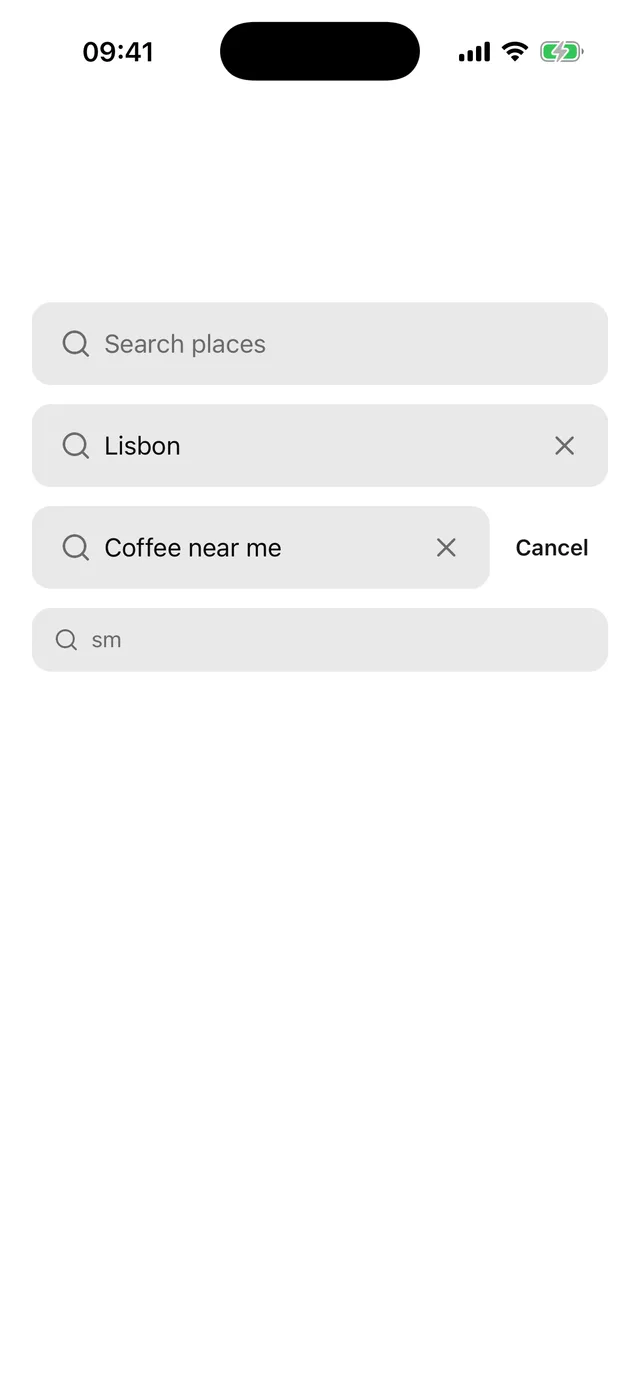
Search field with a magnifier, a clear button and an optional Cancel that appears on focus.

npx @eoria/cli add search-barUsage
import { SearchBar } from '@/components/ui/search-bar'
<SearchBar placeholder="Search places" onSubmit={search} />
<SearchBar  showCancel  value={query}  onChangeText={setQuery}  onSubmit={search}  onCancel={() => setResults([])}/>
Props
| Prop | Values | Default |
|---|---|---|
value, defaultValue |
string. Leave value out and the bar keeps its own text |
'' |
onChangeText |
(text: string) => void |
|
onSubmit |
(text: string) => void, fired by the keyboard search key |
|
onClear |
called after the clear button empties the field | |
showCancel |
boolean | false |
cancelText |
string | Cancel |
onCancel |
called after Cancel empties the field and drops focus | |
clearLabel |
string read out for the clear button | Clear search |
icon |
element accepting size and color |
magnifier |
placeholder |
string, also the default accessibilityLabel |
Search |
size |
sm, md, lg |
md |
disabled |
boolean | false |
styles |
overrides for root, field, cancel, cancelLabel |
|
fieldStyles |
overrides for the InputGroup slots |
Every other TextInput prop passes through, and the ref points at the TextInput.
Notes
- The field is an InputGroup, so it has the Input frame and focus ring.
returnKeyTypeissearch, autocorrect and autocapitalise are off, and the iOS clear button is off because the bar draws its own on both platforms. - The clear button shows while there is text. It empties the field and keeps focus, so the user can type again at once.
- With
showCancel, a ghost Button appears beside the field while it has focus or text. The field narrows over 150 ms and Cancel fades in over the same time. Cancel empties the field, blurs it and callsonCancel. Reduce motion skips both transitions. - Cancel stays while there is text even after the keyboard goes away. Otherwise a tap that dismisses the keyboard would also remove the button under the finger.
- In a
ScrollView, setkeyboardShouldPersistTaps="handled"so clear and Cancel take the first tap. - The field has the
searchrole. Clear and Cancel are buttons with their own labels. - Inside a Sheet the bar works as written. Its field becomes the sheet’s text input, so the sheet lifts with the keyboard. The sheet page has a searchable list example.